> ## Documentation Index
> Fetch the complete documentation index at: https://docs.odin.fun/llms.txt
> Use this file to discover all available pages before exploring further.
# Price Impact Calculation
> Calculate and understand price impact for token trades on Odin
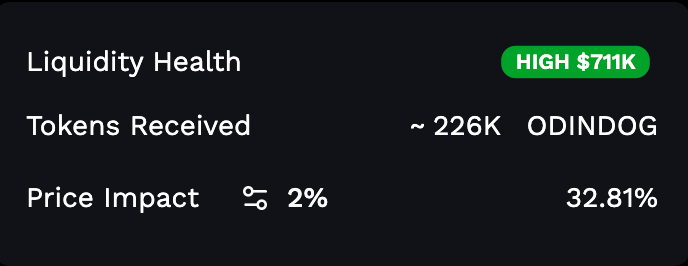
This guide explains how to calculate price impact for token trades using the `getPriceImpact` utility function.
 ## What You'll Accomplish
By the end of this guide, you'll have:
* ✅ Understanding of price impact and its importance
* ✅ Implementation of price impact calculations for bonded tokens
* ✅ Implementation of price impact calculations for unbonded tokens
* ✅ Test cases for validating price impact calculations
* ✅ Real-world examples using actual token data
## What is Price Impact?
Price impact represents how much a trade will affect the token's price. It's expressed as a percentage and indicates:
* **Higher price impact** = Your trade will significantly move the price
* **Lower price impact** = Your trade will have minimal effect on the price
Price impact is crucial for:
* **Traders**: Understanding the cost of their trades
* **UI/UX**: Showing users the expected price change
* **Risk Management**: Warning users about large trades
## Price Impact Function
The `getPriceImpact` function calculates price impact differently depending on whether a token is bonded or unbonded:
* **Bonded Tokens**: Use AMM (Automated Market Maker) liquidity pool calculations
* **Unbonded Tokens**: Use bonding curve mathematics
### Function Signature
```typescript theme={null}
getPriceImpact(
currency: "btc" | "token",
amount: string,
token: Pick,
isBuy: boolean
): number | null
```
## Installation and Setup
First, ensure you have the required utilities:
```typescript theme={null}
import { getPriceImpact } from "./utils/getPriceImpact";
import { Token } from "./types/token";
```
## Example 1: Bonded Token (ODINDOG)
Bonded tokens use liquidity pool calculations. Here's an example with ODINDOG:
```typescript theme={null}
// ODINDOG token data (bonded token)
const odinDogToken = {
id: "2jjj",
name: "ODINDOG",
image: "5707baf4-9a4f-4618-b2d6-19d2b397c488.webp",
price: 330189,
ticker: "ODINDOG",
token_liquidity: BigInt("91549588409635445"),
btc_liquidity: BigInt("302286688964"),
user_lp_tokens: BigInt("71796470791782687"),
user_btc_liquidity: BigInt("134734285721"),
user_token_liquidity: BigInt("40806274831960704"),
sold: BigInt("1680000000000000000"),
bonded: true,
decimals: 3,
divisibility: 8,
};
// Calculate price impact for buying 1 BTC worth of ODINDOG
const buyImpact = getPriceImpact("btc", "1", odinDogToken, true);
console.log(`Buy 1 BTC impact: ${(buyImpact! * 100).toFixed(2)}%`);
// Output: Buy 1 BTC impact: 32.92%
// Calculate price impact for selling 100,000 ODINDOG tokens
const sellImpact = getPriceImpact("token", "100000", odinDogToken, false);
console.log(`Sell 100k tokens impact: ${(sellImpact! * 100).toFixed(2)}%`);
// Output: Sell 100k tokens impact: 10.30%
```
## Example 2: Unbonded Token
Unbonded tokens use bonding curve calculations:
```typescript theme={null}
// Unbonded token data
const unbondedToken = {
id: "2xxx",
name: "UNBONDED TOKEN",
image: "example.webp",
price: 984,
ticker: "UNBONDED",
token_liquidity: BigInt(0),
btc_liquidity: BigInt(0),
user_lp_tokens: BigInt(0),
user_btc_liquidity: BigInt(0),
user_token_liquidity: BigInt(0),
sold: BigInt("963485413186288939"),
bonded: false,
decimals: 3,
divisibility: 8,
};
// Calculate price impact for buying 0.01 BTC worth on bonding curve
const bondingBuyImpact = getPriceImpact("btc", "0.01", unbondedToken, true);
console.log(`Bonding curve buy impact: ${(bondingBuyImpact! * 100).toFixed(2)}%`);
// Output: Bonding curve buy impact: 11.79%
// Calculate price impact for selling 100,000 tokens on bonding curve
const bondingSellImpact = getPriceImpact("token", "100000", unbondedToken, false);
console.log(`Bonding curve sell impact: ${(bondingSellImpact! * 100).toFixed(2)}%`);
// Output: Bonding curve sell impact: 2.13%
```
## Understanding Different Scenarios
### Currency Types
The function supports two currency types:
1. **"btc"**: Calculate impact when trading with Bitcoin
2. **"token"**: Calculate impact when trading with token amounts
### Trade Types
1. **Buy (isBuy: true)**: Purchasing tokens
2. **Sell (isBuy: false)**: Selling tokens
### Token States
1. **Bonded (bonded: true)**: Token has graduated to AMM liquidity pool
2. **Unbonded (bonded: false)**: Token is still on the bonding curve
## Error Handling
The function returns `null` in several error cases:
```typescript theme={null}
// Invalid scenarios that return null
const invalidCases = [
getPriceImpact("btc", "0", token, true), // Zero amount
getPriceImpact("btc", "", token, true), // Empty string
getPriceImpact("btc", "invalid", token, true), // Non-numeric string
getPriceImpact("btc", "999999999", token, false), // Amount exceeds liquidity
];
// Always check for null before using the result
const impact = getPriceImpact("btc", "1", token, true);
if (impact !== null) {
console.log(`Price impact: ${(impact * 100).toFixed(2)}%`);
} else {
console.log("Invalid trade parameters");
}
```
## Practical Implementation
Here's a complete implementation you might use in a trading interface:
```typescript theme={null}
function formatPriceImpact(
currency: "btc" | "token",
amount: string,
token: any,
isBuy: boolean
): string {
const impact = getPriceImpact(currency, amount, token, isBuy);
if (impact === null) {
return "Invalid trade";
}
const percentageImpact = impact * 100;
const action = isBuy ? "Buy" : "Sell";
const warningLevel = percentageImpact > 10 ? "⚠️ High" :
percentageImpact > 5 ? "⚡ Medium" :
"✅ Low";
return `${action} Impact: ${warningLevel} ${percentageImpact.toFixed(2)}%`;
}
// Usage examples
console.log(formatPriceImpact("btc", "1", odinDogToken, true));
// Output: Buy Impact: ⚠️ High 32.92%
console.log(formatPriceImpact("token", "10000", odinDogToken, false));
// Output: Sell Impact: ✅ Low 1.08%
```
## Best Practices
Always validate price impact before executing trades, especially for large amounts that could significantly affect token prices.
1. **Show Users Impact**: Always display price impact to users before they confirm trades
2. **Set Thresholds**: Warn users when price impact exceeds reasonable thresholds (e.g., 5% or 10%)
3. **Handle Errors**: Gracefully handle `null` returns from the function
4. **Test Thoroughly**: Use the provided test cases and create additional ones for your specific use cases
5. **Monitor Real-time**: Price impact can change rapidly, so recalculate frequently for active trading interfaces
## Next Steps
Coming soon - Learn how to calculate and handle slippage for token trades
Coming soon - Calculate minimum amounts users will receive for token trades
The code used in this guide is published at [https://github.com/Toniq-Labs/odin-docs/tree/main/demo/getting-started](https://github.com/Toniq-Labs/odin-docs/tree/main/demo/getting-started).
## What You'll Accomplish
By the end of this guide, you'll have:
* ✅ Understanding of price impact and its importance
* ✅ Implementation of price impact calculations for bonded tokens
* ✅ Implementation of price impact calculations for unbonded tokens
* ✅ Test cases for validating price impact calculations
* ✅ Real-world examples using actual token data
## What is Price Impact?
Price impact represents how much a trade will affect the token's price. It's expressed as a percentage and indicates:
* **Higher price impact** = Your trade will significantly move the price
* **Lower price impact** = Your trade will have minimal effect on the price
Price impact is crucial for:
* **Traders**: Understanding the cost of their trades
* **UI/UX**: Showing users the expected price change
* **Risk Management**: Warning users about large trades
## Price Impact Function
The `getPriceImpact` function calculates price impact differently depending on whether a token is bonded or unbonded:
* **Bonded Tokens**: Use AMM (Automated Market Maker) liquidity pool calculations
* **Unbonded Tokens**: Use bonding curve mathematics
### Function Signature
```typescript theme={null}
getPriceImpact(
currency: "btc" | "token",
amount: string,
token: Pick,
isBuy: boolean
): number | null
```
## Installation and Setup
First, ensure you have the required utilities:
```typescript theme={null}
import { getPriceImpact } from "./utils/getPriceImpact";
import { Token } from "./types/token";
```
## Example 1: Bonded Token (ODINDOG)
Bonded tokens use liquidity pool calculations. Here's an example with ODINDOG:
```typescript theme={null}
// ODINDOG token data (bonded token)
const odinDogToken = {
id: "2jjj",
name: "ODINDOG",
image: "5707baf4-9a4f-4618-b2d6-19d2b397c488.webp",
price: 330189,
ticker: "ODINDOG",
token_liquidity: BigInt("91549588409635445"),
btc_liquidity: BigInt("302286688964"),
user_lp_tokens: BigInt("71796470791782687"),
user_btc_liquidity: BigInt("134734285721"),
user_token_liquidity: BigInt("40806274831960704"),
sold: BigInt("1680000000000000000"),
bonded: true,
decimals: 3,
divisibility: 8,
};
// Calculate price impact for buying 1 BTC worth of ODINDOG
const buyImpact = getPriceImpact("btc", "1", odinDogToken, true);
console.log(`Buy 1 BTC impact: ${(buyImpact! * 100).toFixed(2)}%`);
// Output: Buy 1 BTC impact: 32.92%
// Calculate price impact for selling 100,000 ODINDOG tokens
const sellImpact = getPriceImpact("token", "100000", odinDogToken, false);
console.log(`Sell 100k tokens impact: ${(sellImpact! * 100).toFixed(2)}%`);
// Output: Sell 100k tokens impact: 10.30%
```
## Example 2: Unbonded Token
Unbonded tokens use bonding curve calculations:
```typescript theme={null}
// Unbonded token data
const unbondedToken = {
id: "2xxx",
name: "UNBONDED TOKEN",
image: "example.webp",
price: 984,
ticker: "UNBONDED",
token_liquidity: BigInt(0),
btc_liquidity: BigInt(0),
user_lp_tokens: BigInt(0),
user_btc_liquidity: BigInt(0),
user_token_liquidity: BigInt(0),
sold: BigInt("963485413186288939"),
bonded: false,
decimals: 3,
divisibility: 8,
};
// Calculate price impact for buying 0.01 BTC worth on bonding curve
const bondingBuyImpact = getPriceImpact("btc", "0.01", unbondedToken, true);
console.log(`Bonding curve buy impact: ${(bondingBuyImpact! * 100).toFixed(2)}%`);
// Output: Bonding curve buy impact: 11.79%
// Calculate price impact for selling 100,000 tokens on bonding curve
const bondingSellImpact = getPriceImpact("token", "100000", unbondedToken, false);
console.log(`Bonding curve sell impact: ${(bondingSellImpact! * 100).toFixed(2)}%`);
// Output: Bonding curve sell impact: 2.13%
```
## Understanding Different Scenarios
### Currency Types
The function supports two currency types:
1. **"btc"**: Calculate impact when trading with Bitcoin
2. **"token"**: Calculate impact when trading with token amounts
### Trade Types
1. **Buy (isBuy: true)**: Purchasing tokens
2. **Sell (isBuy: false)**: Selling tokens
### Token States
1. **Bonded (bonded: true)**: Token has graduated to AMM liquidity pool
2. **Unbonded (bonded: false)**: Token is still on the bonding curve
## Error Handling
The function returns `null` in several error cases:
```typescript theme={null}
// Invalid scenarios that return null
const invalidCases = [
getPriceImpact("btc", "0", token, true), // Zero amount
getPriceImpact("btc", "", token, true), // Empty string
getPriceImpact("btc", "invalid", token, true), // Non-numeric string
getPriceImpact("btc", "999999999", token, false), // Amount exceeds liquidity
];
// Always check for null before using the result
const impact = getPriceImpact("btc", "1", token, true);
if (impact !== null) {
console.log(`Price impact: ${(impact * 100).toFixed(2)}%`);
} else {
console.log("Invalid trade parameters");
}
```
## Practical Implementation
Here's a complete implementation you might use in a trading interface:
```typescript theme={null}
function formatPriceImpact(
currency: "btc" | "token",
amount: string,
token: any,
isBuy: boolean
): string {
const impact = getPriceImpact(currency, amount, token, isBuy);
if (impact === null) {
return "Invalid trade";
}
const percentageImpact = impact * 100;
const action = isBuy ? "Buy" : "Sell";
const warningLevel = percentageImpact > 10 ? "⚠️ High" :
percentageImpact > 5 ? "⚡ Medium" :
"✅ Low";
return `${action} Impact: ${warningLevel} ${percentageImpact.toFixed(2)}%`;
}
// Usage examples
console.log(formatPriceImpact("btc", "1", odinDogToken, true));
// Output: Buy Impact: ⚠️ High 32.92%
console.log(formatPriceImpact("token", "10000", odinDogToken, false));
// Output: Sell Impact: ✅ Low 1.08%
```
## Best Practices
Always validate price impact before executing trades, especially for large amounts that could significantly affect token prices.
1. **Show Users Impact**: Always display price impact to users before they confirm trades
2. **Set Thresholds**: Warn users when price impact exceeds reasonable thresholds (e.g., 5% or 10%)
3. **Handle Errors**: Gracefully handle `null` returns from the function
4. **Test Thoroughly**: Use the provided test cases and create additional ones for your specific use cases
5. **Monitor Real-time**: Price impact can change rapidly, so recalculate frequently for active trading interfaces
## Next Steps
Coming soon - Learn how to calculate and handle slippage for token trades
Coming soon - Calculate minimum amounts users will receive for token trades
The code used in this guide is published at [https://github.com/Toniq-Labs/odin-docs/tree/main/demo/getting-started](https://github.com/Toniq-Labs/odin-docs/tree/main/demo/getting-started).